Party mode: your TV is the console, every phone is a controller
Why Gamero party mode is the easiest game night you'll ever set up: one screen, a QR code, everyone's phone, and a scoreboard that runs all night.
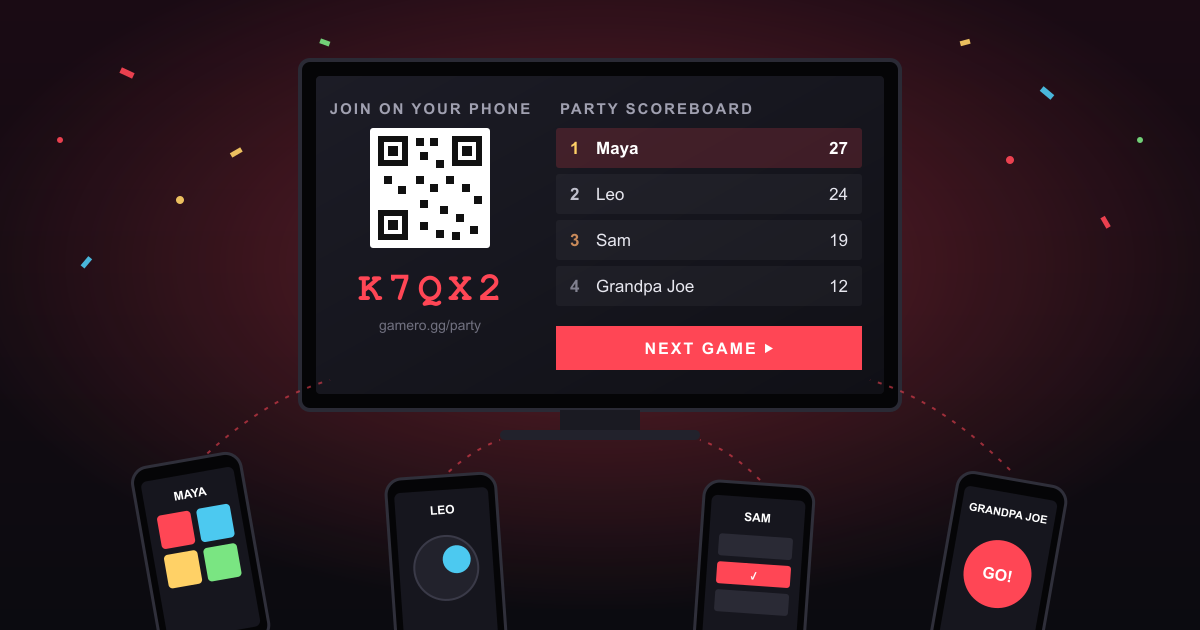
You know the moment. Friends are over, someone says "let's play something", and then it falls apart: there are only two controllers, one of them is dead, half the room doesn't own the console, and nobody wants to spend ten minutes installing an app. By the time it works, the mood is gone.
Party mode fixes all of that. Open gamero.gg/party on the TV or a laptop (or just your phone, if there's no TV around), and everyone joins by scanning a QR code with their phone. That's it. Ten seconds later the whole room is playing.
How it works
- Open a party on the big screen. A smart TV browser, a laptop plugged into the TV, or just a laptop on the coffee table. No account needed.
- Everyone scans the QR code. Or types the five-letter code. Guests just pick a name, signed-in players join straight away. No app, no download, no sign-up.
- Pick a game and play. The screen shows the action, the phones turn into controllers: buttons, a joystick, quiz answers, whatever the game needs.
- Play the next one. When a game ends, everyone stays connected. Pick another game and keep going.
No TV? Just phones
On a train, at the campsite, in a café: when there's no big screen, choose 📱 Just phones when you start the party. Your phone becomes the host: it runs the game, shows the code and QR code for the others to scan, and you play too. Everyone else joins on their own phone, exactly like with a TV, and the scoreboard works the same way.
Games made for a TV work too: the host's phone shows the game on top for the whole table and the host's own controller below, so the host plays like everyone else. Found a TV halfway through the night? Tap Move the screen, open the party on the TV, and keep going with the same scoreboard. Your phone turns into a normal controller.
Why it's so much fun
Everybody plays. Not two people with controllers and four people watching. Party mode handles up to 16 players, so the whole room is in every round, including the friend who "doesn't really play games". Those are usually the ones shouting the loudest by round three.
One scoreboard for the whole night. This is the part that turns a few games into a real competition. Every game ranks the players, and the points carry over: 1st gets 10 points, 2nd 7, 3rd 5, 4th 3, 5th 2, and everyone else who placed gets 1. Lost the quiz? Win the racing game and you're right back in it. The scoreboard sits on the TV between games, so everyone can see who's on top, and who needs a comeback.
Variety keeps it fresh. A quiz, then a reaction game, then something chaotic. Every game is short, so no single game outstays its welcome, and the person who's bad at one kind of game gets their moment in the next.
Eyes up, not down. Your phone is just a controller. The fun is on the shared screen, where everyone watches the same moment and reacts to it together. That's what makes it a party and not six people on their own phones in the same room.
It forgives a messy room. Phone locked? It reconnects and carries on. Someone arrives late? They scan the code and join for the next game. Want to move from the laptop to the TV halfway through? The owner can move the screen to another device without ending the party.
Perfect for
- Game nights with friends, when you don't want to argue over whose turn it is.
- Family evenings: if Grandpa can scan a QR code, Grandpa can play. And win.
- Office breaks and team events: one laptop on the meeting-room screen, everyone joins from their desk.
- Classrooms and clubs: quick rounds that everyone in the room takes part in.
- Trips and nights out: no TV needed. Start a just-phones party and pass the QR code around the table.
Make friends while you play
Signed-in players can add each other as friends right from the party, and when the party ends, Gamero offers to add everyone you just played with. Next time, they're one tap away. Guests are welcome too, but signing in keeps your stats and your friends list.
Make a party game
Building web games? Party games are some of the most fun games to make, and Gamero takes care of everything around them: joining, QR codes, seats, reconnecting phones and the scoreboard. Your game plays one round and reports who placed where. There's no server to write or host. Read the party mode section of the creator guide, or copy its prompt into your AI coding assistant and let it build the screen and the controller for you.
Start a party tonight
Grab the TV remote, open Gamero, and tell everyone to get their phones out. The hardest part will be deciding who goes first.